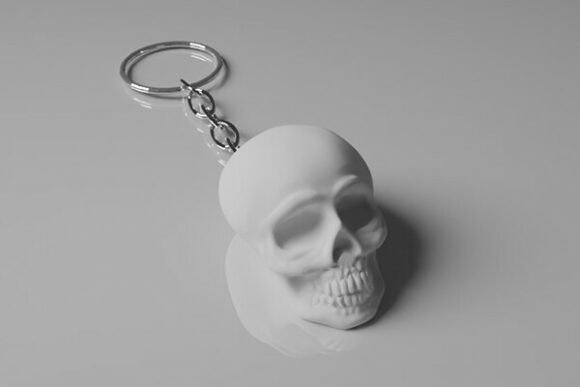
Skull Keychain Digital 3d Printing File
The intersection of personal style and functional accessories has never been more accessible than it is today, largely thanks to the democratization of digital manufacturing. Among the most popular items for hobbyists and small business owners alike is the Skull Keychain Digital 3d Printing File. This specific STL file offers a blend of aesthetic appeal and practical utility, allowing users to create durable, custom keyrings that stand out from mass-produced alternatives. However, while the promise of a quick, high-quality print is appealing, the path to a successful physical object requires more than just hitting "print." Understanding the nuances of digital downloads, printer settings, and material choices is essential for avoiding frustration and ensuring your final product meets professional standards.
Understanding the Digital Asset
Before diving into the printing process, it is crucial to clarify what you are actually purchasing. When you acquire the Skull Keychain – STL File for 3D Printing Digital Download, you are not receiving a physical object. You are acquiring a digital blueprint—a collection of geometric data that defines the shape, texture, and structure of the keychain. This distinction is vital because it shifts the responsibility of quality control entirely onto the user’s hardware and skill set. The file itself is designed with clean, high-quality geometry, created using professional 3D software to ensure that the mesh is watertight and error-free. This foundation is critical; poor geometry in an STL file can lead to failed prints, layer shifting, or structural weaknesses that no amount of post-processing can fix.
The design specifically caters to ease of use, featuring a print-in-place mechanism. This means the moving parts, such as the clasp or hinge required to attach keys, are modeled as a single continuous piece without the need for separate assembly. While this sounds convenient, it introduces specific challenges regarding printer calibration and slicer settings that many beginners overlook.
Common Pitfalls in Print Preparation
One of the most frequent mistakes users make when downloading files like the Skull Keychain Digital 3d Printing File is assuming that all 3D printers behave ident. The file was tested using PLA on a Bambu Lab A1 Mini, a device known for its precision and consistency. However, if you are printing on an older FDM printer with loose belts, a wobbly bed, or inconsistent extrusion, the results may differ significantly. The print-in-place design relies on tight tolerances between moving parts. If your printer is under-extruding, those gaps may close up completely, rendering the keychain useless. Conversely, over-extrusion can cause parts to fuse together permanently.
Another overlooked detail is the orientation of the model within the slicing software. While the skull design might look impressive standing upright, printing it flat against the build plate often yields stronger results for load-bearing components like the keyring loop. Additionally, the angle at which the print-in-place hinges are oriented can affect how easily they move after printing. Users should carefully inspect the support structures (if any) and consider rotating the model to minimize the need for supports, which can leave unsightly marks on the delicate details of the skull’s eye sockets and teeth.
The Importance of Material Selection
While PLA is the recommended material due to its ease of use and dimensional stability, it is not always the best choice for every application. PLA is rigid but can become brittle in cold temperatures or warp in hot cars. For a keychain that will be carried daily, exposed to pocket lint, dropped on pavement, or left in a warm vehicle, considering PETG or ABS might be wise. These materials offer greater durability and heat resistance. However, switching materials requires adjusting temperature profiles and cooling fans. A user who switches from PLA to PETG without updating their slicer settings may encounter stringing or poor layer adhesion, compromising the integrity of the skull’s intricate features.
Evaluating Quality Before You Print
To avoid wasting filament and time, take a moment to evaluate the file before slicing. Open the STL in your preferred 3D modeling or slicing software and zoom in on the critical areas: the connection points of the print-in-place hinge and the thickness of the keyring loop. Look for non-manifold edges, overlapping faces, or inverted normals—common errors in poorly generated STL files. Although this file is described as error-free, verifying the mesh health yourself is a good habit. It ensures that the slicer can generate a valid toolpath without getting confused by complex intersections.
Furthermore, consider the scale of the print. Some digital files are provided in millimeters but may appear too large or too small depending on how the user imports them. Always check the dimensions in your software to ensure the keychain fits comfortably in your hand and on your belt loop. A keychain that is too heavy can be cumbersome, while one that is too light may feel cheap. The balance achieved in this design aims for a substantial yet manageable weight, but achieving that balance depends on accurate scaling during the slicing phase.
Post-Processing and Final Touches
Once the print is complete, the work is not necessarily done. Print-in-place designs often require a bit of manual intervention to activate the moving parts. Gently flex the hinge back and forth to break the thin layers of plastic that form during printing. Be careful not to apply excessive force, especially if you are using brittle materials like standard PLA. If the part feels stuck, it may indicate that your printer’s flow rate was too high, causing the layers to bond where they shouldn’t have. In such cases, reducing the flow percentage in future prints can resolve the issue.
For those looking to enhance the presentation, consider painting or staining the keychain. The clean geometry of the Skull Keychain Digital 3d Printing File provides excellent surface area for detailing. Use a primer suitable for plastics to ensure paint adhesion, and apply thin coats to avoid obscuring the fine details of the skull’s anatomy. This step transforms a simple plastic print into a polished accessory suitable for gifting or sale.
Legal and Ethical Considerations
It is important to respect the intellectual property rights associated with digital assets. The copyright remains with the creator upon purchase. This means you are licensed to print the item for personal use or potentially for small-scale commercial sales, depending on the specific terms provided by the seller. Always review the license agreement included with the download. Misunderstanding these terms can lead to legal issues, particularly if you intend to sell the printed keychains online. Many creators allow commercial use but prohibit reselling the digital file itself. Adhering to these guidelines supports the ecosystem of independent designers and ensures that high-quality content continues to be produced.
Conclusion
The Skull Keychain Digital 3d Printing File represents a well-crafted solution for enthusiasts looking to add a touch of edgy elegance to their everyday carry. By understanding the technical requirements, selecting appropriate materials, and paying attention to printer calibration, users can achieve consistent, high-quality results. Avoiding common pitfalls such as ignoring tolerance settings or rushing through post-processing will save time and resources. Ultimately, the success of your print lies not just in the quality of the digital file, but in the care and knowledge applied during the printing process. With the right approach, this STL file can serve as a rewarding project that bridges the gap between digital creativity and tangible utility.